
How Site Speed Affects SEO in 2026 (And Why It Matters More Than Ever)

Site speed directly affects SEO by influencing rankings, user engagement, crawl efficiency, and conversion rates. Google evaluates Core Web Vitals as part of its Page Experience criteria, making performance a meaningful ranking signal. In 2026, understanding how site speed affects SEO means looking beyond traditional rankings to see how seemingly minor performance issues can quietly limit organic visibility, paid media efficiency, and AI extractability at the same time.
In this article, we break down what site speed actually measures, why it matters for both SEO and AI visibility, and how to improve performance without overhauling your entire tech stack.
Table of Contents:
- What Is Site Speed?
- What Is Considered a Good Site Speed in 2026?
- Mobile vs. Desktop Site Speed
- How Site Speed Affects SEO
- How Site Speed Affects AEO and AI Visibility
- Do You Need Site Speed Improvements?
- How to Improve Site Speed
- Case Study: Improving Site Speed on WordPress
- Why Site Speed Is a Visibility Multiplier
- Frequently Asked Questions
Key Takeaways
- Site speed is a confirmed ranking signal. Core Web Vitals are evaluated as part of Google’s Page Experience criteria and can influence visibility when competing pages are closely matched.
- Slow pages lose visitors quickly. Even small delays increase abandonment risk, particularly on mobile devices.
- Mobile performance sets the baseline. Google uses mobile-first indexing, meaning the mobile version of your site is the primary version evaluated for search visibility.
- Performance affects AI accessibility. Lightweight, stable pages reduce technical friction and support more reliable content retrieval in AI-driven search environments.
- Speed strengthens results across channels. Faster pages improve user experience for paid media, reinforce Page Experience signals for SEO, and create a stronger foundation for AI visibility.

What Is Site Speed?
Site speed refers to how quickly a web page loads and becomes usable for visitors. It includes how fast content appears, how quickly users can interact with the page, and how stable the layout remains while loading. Search engines use performance metrics to evaluate site speed as part of overall page experience and ranking signals.
- Page Load Time: The total time it takes for a page to fully load in a browser. Faster load times reduce bounce rates and improve user engagement.
- Time to First Byte (TTFB): The time between a user’s request and the first byte of data received from the server. Lower TTFB indicates efficient server response and hosting performance.
- Largest Contentful Paint (LCP): The time it takes for the largest visible element on a page to load. Google recommends keeping LCP under 2.5 seconds for strong SEO performance.
- Interaction to Next Paint (INP): The time it takes for a page to respond to user interaction. INP replaced First Input Delay (FID) in 2024 and measures real responsiveness across the full page lifecycle.
- Cumulative Layout Shift (CLS): A measure of visual stability. A CLS score under 0.1 ensures elements do not shift unexpectedly while loading.
- Speed Index: A performance metric that measures how quickly visible content appears during page load.
What Is Considered a Good Site Speed in 2026?
A good site speed is typically under 2.5 seconds for Largest Contentful Paint (LCP), under 200 milliseconds for Interaction to Next Paint (INP), and a Cumulative Layout Shift (CLS) score under 0.1.
Recommended Core Web Vitals Benchmarks
Core Web Vitals are used to evaluate page experience and performance. To maintain strong SEO performance in 2026, websites should meet the following recommended benchmarks.
| Metric | Recommended Benchmark | What It Measures | Why It Matters for SEO and AEO |
| Largest Contentful Paint (LCP) | Under 2.5 seconds | How quickly the largest visible content element loads | Impacts rankings and perceived speed. Slow LCP increases bounce rates and reduces engagement signals. |
| Interaction to Next Paint (INP) | Under 200 milliseconds | How quickly a page responds to user interaction | Measures real responsiveness across the full page lifecycle. Replaced FID in 2024. Poor responsiveness harms UX and engagement. |
| Cumulative Layout Shift (CLS) | Under 0.1 | Visual stability while the page loads | Prevents layout shifting that frustrates users. Strong CLS improves trust and usability signals. |
| Time to First Byte (TTFB) | Under 800 milliseconds (ideal under 200ms) | Server response time | Faster server responses reduce retrieval friction for both traditional crawlers and AI systems. |
| Speed Index | Under 3.0 seconds | How quickly visible content appears | Impacts perceived performance and first impressions. |
Pages that consistently meet Core Web Vitals benchmarks provide a stronger user experience and are less likely to be abandoned. According to research from the Google News Initiative, users are 24% less likely to abandon a page when it meets Core Web Vitals thresholds.
While performance is only one ranking factor, fast and stable pages support stronger engagement signals, improved crawl efficiency, and more reliable content extraction in AI-driven environments.
How Fast Is “Too Slow”?
A page that takes longer than three seconds to load is generally considered too slow for strong SEO performance. Even a one-second delay can increase bounce rates and reduce conversions. On mobile devices, where network conditions are less stable, users are even less tolerant of delays.
Research has shown that as page load time increases from one to three seconds, the probability of bounce rises significantly. Slow pages lose visitors, reduce engagement, and limit the effectiveness of your content — weakening the overall performance of the page in search environments.
Mobile vs. Desktop Site Speed: Why Mobile Matters More
Mobile site speed has a greater impact on SEO because Google uses mobile-first indexing. The mobile version of your site is the primary version evaluated for rankings. A slow mobile experience can hurt visibility, even when desktop performance looks strong.
Why Sites Often Perform Worse on Mobile
Many websites score well on desktop but struggle on mobile due to several environmental and technical constraints:
- Slower cellular networks
- Limited device processing power
- Heavier impact from JavaScript and third-party scripts
- More noticeable layout shifts on smaller viewports
Even small delays on mobile can increase bounce rates and reduce engagement.
Desktop vs. Mobile Performance Comparison
Mobile and desktop environments operate under very different performance conditions. Understanding these differences helps explain why mobile speed carries more weight in modern SEO.
| Factor | Desktop | Mobile |
| Network Speed | High-speed broadband | Variable cellular |
| Device Power | Strong processors | Limited processing |
| Ranking Evaluation | Important | Primary indexing standard |
| User Sensitivity to Speed | Moderate | High |
Mobile speed influences mobile-first indexing, Core Web Vitals performance, engagement metrics, and crawl efficiency. In AI-driven search environments, slower mobile rendering can also reduce extractability and citation potential. In 2026, mobile speed is the baseline standard for search visibility.
How Site Speed Affects SEO
Site speed affects SEO by influencing page experience signals, crawl efficiency, and overall user engagement. While performance is only one ranking factor, it plays a meaningful role when search engines evaluate competing pages.
1. Site Speed Is a Direct Google Ranking Factor
Google includes Core Web Vitals as part of its Page Experience evaluation. Pages that meet recommended performance thresholds provide a better user experience and are less likely to be deprioritized when competing content is similar in relevance and quality.
Core Web Vitals are not the strongest ranking factor, but they can act as a tie-breaker when multiple pages offer comparable content.
2. Faster Sites Reduce Bounce Rates
Google does not use bounce rate directly as a ranking factor. However, user experience still matters. Slow-loading pages frustrate visitors, increase abandonment risk, and reduce the likelihood of meaningful interaction.
When users leave quickly or fail to engage, the effectiveness of the page declines — limiting the performance potential of otherwise strong content.
Monitoring Core Web Vitals alongside broader website KPIs helps identify when performance is limiting search visibility.
3. Site Speed Improves Crawl Efficiency
Search engines allocate a crawl budget to each website. For large or frequently updated sites, this matters significantly.
Slow server response times (TTFB) and heavy page resources require more processing time, which can reduce the number of pages crawled during each visit. Faster pages allow bots to discover and process more content efficiently, improving indexing frequency.
This becomes especially important for websites that publish content regularly or rely on timely updates.
4. Speed Increases Conversion Rates
Beyond rankings, site speed directly affects business outcomes. Faster pages reduce friction, increase trust, and make it easier for users to complete desired actions.
Even small performance improvements can meaningfully improve form submissions, purchases, and overall return on marketing investment. Site speed is often one of the most controllable levers for improving digital performance without changing content strategy.

How Site Speed Affects AEO and AI Visibility
AI-driven search environments increasingly summarize and surface content directly within search results. For your content to appear in AI-generated answers, it must be easily retrievable, crawlable, and structurally clear.
Site speed plays a role in that accessibility. Faster, lightweight pages reduce friction during crawling and rendering, supporting more consistent content retrieval.
1. Faster Pages Are Easier for AI to Crawl
AI systems and search crawlers must retrieve and render your content before it can be indexed, summarized, or cited. Slow server response times and heavy JavaScript increase processing time and can delay rendering of key content elements.
Pages with fast TTFB and lightweight rendering frameworks make it easier for bots to access the full content without additional execution overhead.
2. Clean, Fast HTML Improves LLM Extractability
Large language models rely on structured, stable HTML to extract information accurately. Excessive client-side rendering, bloated DOM structures, and shifting layouts can make content harder to interpret reliably.
Well-structured headings, fast-loading primary content, and stable page layouts improve the clarity of your content for both search engines and AI-driven systems.
Running your site through an AI Readiness assessment can help identify structural or performance issues that limit extractability.
3. Performance Is a Trust Signal
Fast, stable pages reflect strong technical infrastructure. While performance alone does not guarantee AI citations, slow and unstable experiences introduce friction into the content retrieval process.
Meeting Core Web Vitals benchmarks, reducing render-blocking resources, and improving server response times create a more reliable foundation for both traditional SEO and AI visibility. Platforms like Trustworthy Signals help connect technical performance patterns to branded search growth and lead outcomes.
Speed strengthens the technical foundation for AI visibility, but it is not the only factor. Content structure, entity clarity, and authority signals also influence how consistently pages are retrieved and cited. For a deeper look, explore our guide to the most effective strategies for AI visibility enhancement.

Find Out If Your Site Is Ready for AI Search
AI-driven search rewards sites that are technically sound and easy to extract. Our free assessment reveals performance and structural gaps that may be limiting your visibility.
Do You Need Site Speed Improvements?
You likely need site speed improvements if your pages load slower than three seconds, fail Core Web Vitals benchmarks, or show large performance gaps between mobile and desktop.
Site Speed Performance Checklist
If two or more of the following apply to your site, performance optimization should be a priority:
- LCP above 2.5 seconds: The largest visible content element takes too long to render.
- CLS above 0.1: Page elements shift while loading, creating visual instability.
- INP above 200 milliseconds: Pages feel slow or unresponsive to interaction.
- Mobile score under 70 in PageSpeed Insights: Indicates potential mobile performance weaknesses.
- High bounce rates on specific templates: Performance issues may be tied to page build or rendering.
- TTFB above 800 milliseconds: Slow server response delays initial content delivery.
Slow pages can undermine paid media efficiency, reduce AI extractability, and limit organic visibility simultaneously.
How to Improve Site Speed
Improving site speed comes down to reducing the work a browser has to do to render your content. Across every performance project we’ve worked on, the largest gains come from addressing images, code bloat, server infrastructure, and caching, often in that order.
1. Optimize Images and Media
Images are one of the most common causes of slow LCP scores. Convert images to WebP format, implement lazy loading for below-the-fold content, and set explicit width and height attributes to prevent layout shifts. These foundational steps often result in measurable LCP improvements.
2. Reduce JavaScript and CSS Blocking
Render-blocking scripts prevent browsers from displaying content until execution is complete. Defer non-critical JavaScript, remove unused CSS, and minify script files. Third-party tools (such as analytics tags, chat widgets, and ad pixels) are common sources of blocking time and should load asynchronously whenever possible.
3. Improve Hosting and Server Response Times
A content delivery network (CDN) distributes content across edge servers closer to users, reducing latency. Edge caching stores rendered page versions so servers do not regenerate them on every request. Moving from shared hosting to managed cloud or VPS infrastructure is often one of the highest-impact improvements a mid-market site can make.
4. Use Caching and Compression
Browser caching stores static assets locally so returning visitors and crawlers do not repeatedly download the same files. Enable GZIP or Brotli compression to reduce the size of HTML, CSS, and JavaScript before delivery. Together, these changes reduce load times and support more efficient crawling.
Case Study: Improving Site Speed on a New WordPress Build
In a recent performance-first rebuild, we helped a client move from slow, unstable performance to top-tier Core Web Vitals benchmarks. The legacy site struggled with mobile speed, inefficient asset delivery, and structural issues that limited accessibility and content clarity.
The Challenge
The client’s previous site ran on a bloated theme with unoptimized asset delivery, no caching strategy, and a mobile experience well below recommended Core Web Vitals thresholds. Paid media landing pages were losing conversions due to slow load times, and organic performance was limited in part by weak Page Experience metrics.
The Solution
We rebuilt the site on a clean, lightweight WordPress foundation aligned with our technical SEO standards. The build prioritized:
- A lean theme with no unnecessary scripts or dependencies
- Optimized asset loading with deferred JavaScript and compressed media
- Server-side rendering with full caching implementation
- Explicit image dimensions to eliminate layout shift
- Performance benchmarks validated prior to launch
The Results
The rebuilt site achieved performance metrics that placed it in the top tier across key indicators:
- 98 Performance Score
- 1.3s Speed Index
- 160ms Total Blocking Time
- 0 CLS
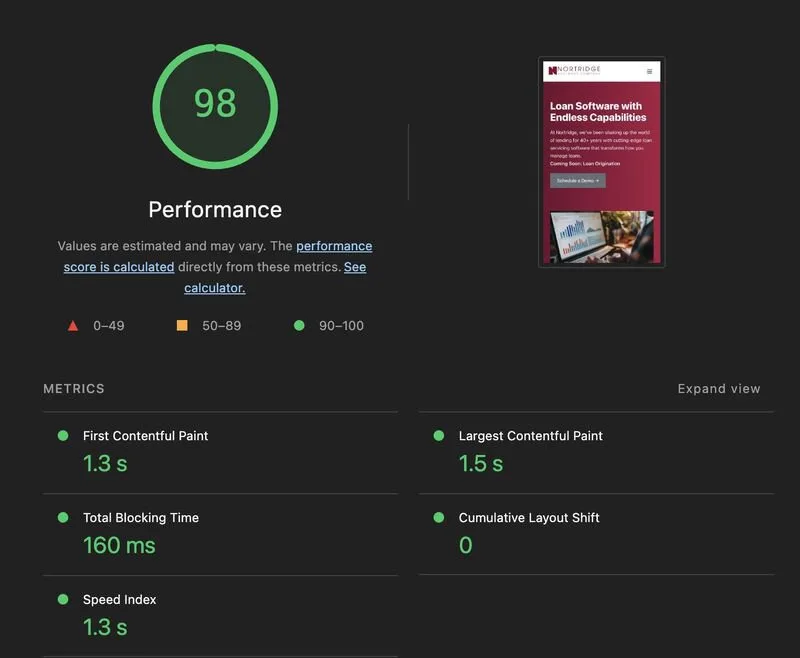
A 1.3-second Speed Index means visitors see primary content almost immediately. Zero layout shift ensures visual stability, improving usability and trust. A 160ms Total Blocking Time supports responsiveness metrics such as INP, making the site feel interactive from the first click.
From an AI visibility standpoint, fast server response, stable layout, and clean HTML create a more reliable foundation for content retrieval and extraction. Performance alone does not guarantee AI citations, but it removes technical friction that can otherwise limit visibility.
Why Site Speed Is Now a Visibility Multiplier
Site speed shapes how efficiently your content can be delivered, crawled, and experienced. Performance does not replace relevance or authority, but it strengthens them by removing technical friction from the search process.
Fast, stable sites support stronger engagement, more efficient crawling, and clearer content retrieval. When the technical foundation performs well, SEO, paid media performance, and AI visibility are better positioned to improve together.
Organic growth becomes more sustainable, paid landing pages convert more efficiently, and AI-driven systems encounter fewer barriers when accessing your content. If your CMS choice, hosting, or site architecture introduces performance drag, that friction can surface across rankings, conversion efficiency, and discoverability at the same time.
Partner With Experts Who Understand SEO and AI Performance
At Trustworthy Digital, site performance is integrated into SEO strategy — not treated as a separate technical task. We combine technical SEO expertise with AI visibility strategy to build and optimize sites that perform across rankings, user experience, and generative search environments.
We help mid-market businesses resolve performance bottlenecks through technical audits, WordPress optimization, Core Web Vitals improvements, and performance-first rebuilds. When site speed improves, the impact extends across organic growth, paid media efficiency, and off-site signals that influence brand discovery across AI and social platforms.
Understanding how site speed affects SEO is no longer optional for growing brands. Performance influences how efficiently your content competes across every channel tied to search visibility.

See Where Performance Is Holding You Back
Schedule a performance-focused SEO strategy session and get a clear roadmap for improving rankings, paid efficiency, and AI visibility.
Frequently Asked Questions
How does site speed affect SEO?
Site speed affects SEO by influencing Core Web Vitals performance, crawl efficiency, and user experience signals. While speed is only one ranking factor, slow pages can reduce engagement and limit search visibility — which should be tracked using relevant Google Analytics KPIs.
How much does site speed affect SEO?
Site speed can meaningfully influence SEO when competing pages are similar in relevance and authority. Meeting Core Web Vitals benchmarks reduces abandonment risk and strengthens user experience, which supports overall search performance.
What is a good site speed score?
A good site speed meets Core Web Vitals benchmarks: LCP under 2.5 seconds, INP under 200 milliseconds, and CLS under 0.1. While a PageSpeed score above 90 is strong, real-user performance data matters most.
Do you need site speed improvements?
If your pages load over three seconds, fail Core Web Vitals benchmarks, or perform significantly worse on mobile, performance optimization should be a priority. Improving speed can support better engagement, conversion efficiency, and search visibility.
How do you improve site speed quickly?
Start by optimizing images (WebP format), deferring non-critical JavaScript, enabling caching, using a CDN, and compressing files with GZIP or Brotli. These steps often produce the fastest performance gains.